STORMSYNCVT/OI Download

Event Replay and chase tools, in v0.0.662.

The Chaser Update is out. Event Replay (beta) plays any past day's warnings back on your stream overlays, at 5x to 120x speed. The Full Chase Overlay is a clean frame for streaming from the road, and a full set of chaser elements goes with it: GPS location, live conditions, storm proximity, intercept ETA, nearby storm reports, chase stats and the Chase Map.

Version v0.0.662 Main feature Event Replay (beta) Status Available now Cost Free
Screenshots use test data. The images on this page are from test sessions, not a real chase. Event Replay is in beta, so tell me if something looks off. Location sharing stays off until you turn it on.
Please leave the watermark visible. The small “StormSync by Zloy” mark on the overlays is how viewers find out where the alerts come from. Nothing in the app stops you from covering it, but hiding it is not very kind to a free project made by one person. It is not a requirement and I will not do anything about it, but it would mean a lot if you left it where it is.
Want something added? Missing a customization or an element you would like? Please reach out. I would be more than happy to add it. Email me.

Two big things.

Event Replay is the main feature of this update. The Full Chase Overlay is the big new piece for chasers.

Available nowBeta

Event Replay (beta)

Play any past day's warnings back on your stream overlays, or browse the day as a highlight log for your VODs. Saved alerts and past SPC outlooks and MCDs live here now too.

  • Any day on record: load the NWS alerts from any past day.
  • On your overlays: replay the day through the same stream overlays you use live, with every alert showing in order.
  • 5x to 120x: replay at several speeds, from 5x up to 120x real time.
  • Highlight log: browse the day's alerts as a list, so finding the moments for your VOD is quick.
  • Everything archived in one place: your saved alerts, past SPC outlooks and past MCDs.
Available nowChasers

Full Chase Overlay

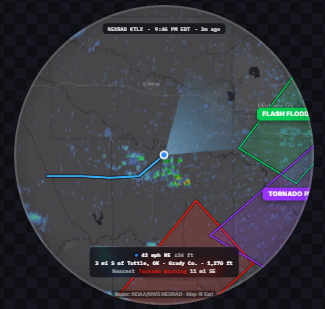
A clean frame for streaming from the road, with your town, the live weather, the round Chase Map and warning popups.

It is one overlay with no clutter, built for a chase stream.

Seven elements for the road.

Use them one at a time as OBS sources, or together in the Full Chase Overlay.

Available nowLocation

GPS Location

Where you are, on screen. Location sharing stays off until you turn it on.

Available nowConditions

Live Conditions

Temperature, dew point, wind, CAPE and other factors where you are.

Available nowAwareness

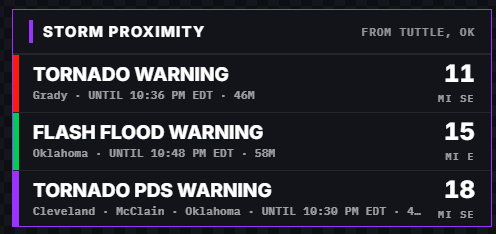
Storm Proximity

How close you are to the warnings around you.

Available nowTargeting

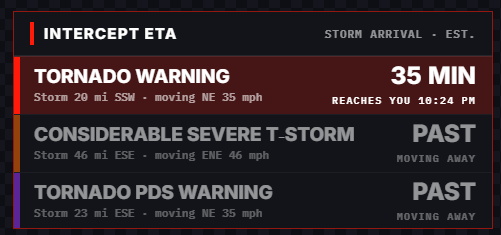
Intercept ETA

An estimated time to reach a storm from where you are.

Available nowReports

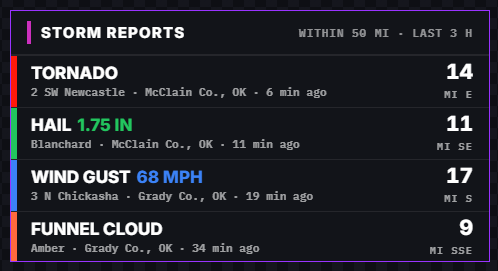
Nearby Storm Reports

Storm reports close to your position.

Available nowStats

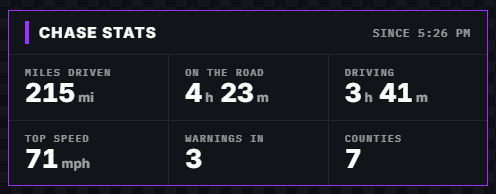
Chase Stats

Miles driven, time on the road, top speed and more.

Available nowMap

Chase Map

A round map with warnings and a GPS indicator showing where you are.

Chasers also get the new Remote scenes: On the road, Technical difficulties and Stream ending.

What it looks like.

Test data from the app. Click any image to see it full size.

Chase map showing warnings and a GPS indicator (test data)
Chase Map A chase map with warnings and a GPS indicator. Test data.
Chase stats showing miles driven, time on the road and top speed (test data)
Chase Stats Miles driven, time on the road, top speed and more. Test data.
Storm proximity to warnings (test data)
Storm Proximity How close you are to the warnings around you. Test data.
Intercept ETA (test data)
Intercept ETA An estimated time to reach the storm. Test data.
Nearby storm reports (test data)
Nearby Storm Reports Storm reports near your position. Test data.
Local weather conditions while chasing: temperature, dew point, wind and CAPE (test data)
Live Conditions Temperature, dew point, wind, CAPE and other factors where you are. Test data.

Built on what was already there.

The live radar warnings map, towns in a warning's path with arrival times, and the Streamer Remote are all still here. You can also pick one font for all your stream overlays and set your own alert colors for the stream.

See the stream tools

Sharing it is optional.

Location elements use the optional "Share my location" feature. It is the most sensitive thing the app can do, so I explain it in detail in the privacy policy.

Take it on your next chase.

Download StormSync, or update from the banner inside the app if you already have it. If something in Event Replay or the chaser tools looks wrong, email me.

By downloading StormSync, you accept the Terms of Service and the Privacy Policy.